
Introducing the Xbility Interactive Setup Guide
A free tool to help you understand and dial in your 1/28 scale RC chassis
Setting up an RC car can feel overwhelming. There are dozens of adjustments - caster, camber, toe, springs, dampers, differentials, ride height, and more - and each one affects how your car behaves in different ways. Change one thing, and it might help corner entry but hurt exit traction. It's a lot to keep track of.
That's why we built the Xbility Interactive Setup Guide.
What Is It?
The Xbility Interactive Setup Guide is a free, web-based reference tool that helps you understand how chassis adjustments affect your car's handling. Instead of flipping through a manual or searching through forum posts, you can quickly find the information you need in one place.
The guide covers four main areas:
- Front Geometry & Steering - Caster, bump steer, toe, Ackermann, camber, camber gain, and roll center
- Chassis Balance & Front Suspension - Droop, ride height, track width, shock position, springs, and shock lube
- Rear Geometry, Diff & Dampers - Rear track, differential settings, spring position, side links, pod squat, pivot ball shims, side damper angle, and damper lube
- General information - How each adjustment works and what it does
How Does It Work?
The guide is designed to be used in multiple ways.
Filter by Problem: If you know what's wrong with your car - understeer, oversteer, or traction roll - you can filter the guide to show only the adjustments that help fix that specific problem. No more guessing which settings to try.
Filter by Corner Phase: You can filter by where in the corner your problem occurs - entry, mid-corner, exit, or even under braking. This helps you narrow down exactly which adjustments are most likely to help.
Sort by Importance: Each adjustment effect has an importance rating (calibrated with input from competitive drivers). You can sort by importance to see the most impactful changes first, or sort by category to see adjustments grouped by type (steering, grip, stability).
## NEW: Dynamic Problem-Solving Charts
When you select a handling problem filter, the guide now displays a visual diagram specific to that issue:
Understeer: See a chassis balance visualization showing how the front needs more grip relative to the rear. The chart includes quick-reference lists for "Add Front Grip" adjustments (more camber, lower ride height, softer springs, more droop) and "Free Up Rear" adjustments (looser diff, less rear droop, narrower rear track, more caster).
Oversteer: View the opposite balance scenario - the rear needs more stability. Quick-reference lists show "Add Rear Stability" options (tighter diff, more rear droop, wider rear track) and "Calm Front Response" adjustments (less caster, less front camber, raise front ride height, stiffer front springs).
Traction Roll: See a weight transfer diagram illustrating why the inside rear wheel lifts. Lists include "Slow Weight Transfer" solutions (softer springs, more droop, lower ride height, lower roll center) and "Keep Wheels Down" options (less camber gain, tighter diff, more rear droop, wider rear track).
These visual guides give you an immediate action plan when you're at the track and need answers fast.
Dynamic Problem-Solving Charts
When you select a handling problem filter, the guide now displays a visual diagram specific to that issue:
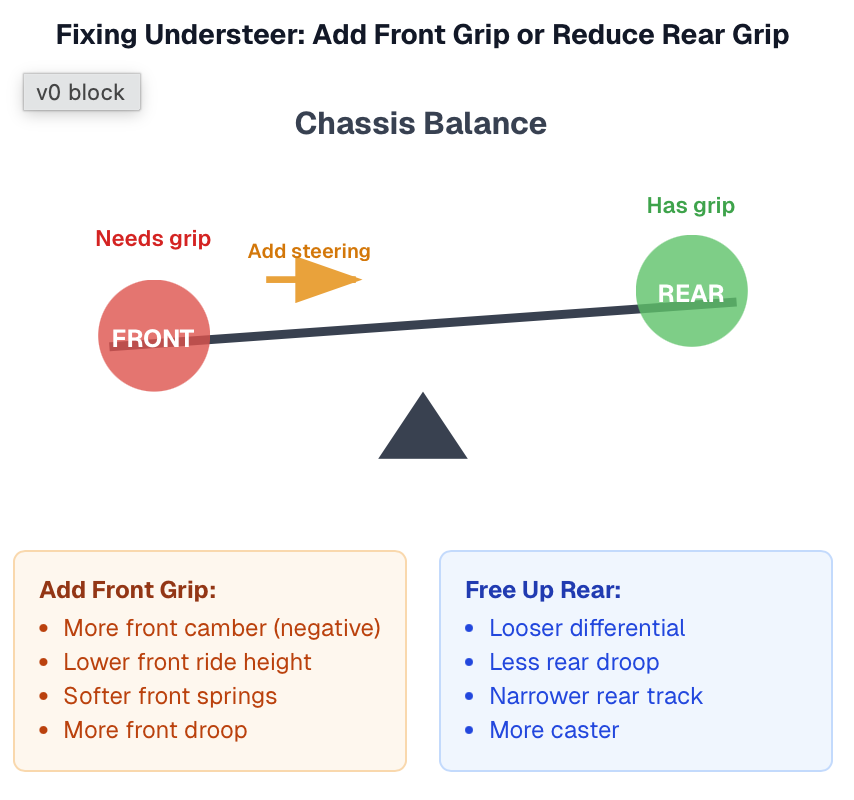
Understeer: See a chassis balance visualization showing how the front needs more grip relative to the rear. The chart includes quick-reference lists for "Add Front Grip" adjustments (more camber, lower ride height, softer springs, more droop) and "Free Up Rear" adjustments (looser diff, less rear droop, narrower rear track, more caster).
Oversteer: View the opposite balance scenario - the rear needs more stability. Quick-reference lists show "Add Rear Stability" options (tighter diff, more rear droop, wider rear track) and "Calm Front Response" adjustments (less caster, less front camber, raise front ride height, stiffer front springs).
Traction Roll: See a weight transfer diagram illustrating why the inside rear wheel lifts. Lists include "Slow Weight Transfer" solutions (softer springs, more droop, lower ride height, lower roll center) and "Keep Wheels Down" options (less camber gain, tighter diff, more rear droop, wider rear track).
These visual guides give you an immediate action plan when you're at the track and need answers fast.
Why We Built This
When you're at the track and your car isn't handling right, you don't have time to read through pages of documentation. You need answers fast. The Interactive Setup Guide puts that information at your fingertips.
We also wanted to help newer racers understand the "why" behind setup changes. Each adjustment includes a description explaining what it is and how it works. Understanding why a change helps is just as important as knowing what to change.
The importance ratings and corner phase assignments have been refined with input from competitive drivers across multiple racing communities, ensuring the guidance reflects real-world racing experience.
Tips for Using the Guide
Make one change at a time. It's tempting to change multiple things at once, but then you won't know which change actually helped. Adjust one setting, test it, and evaluate before moving on.
Judge entry, mid-corner, braking, and exit separately. Your car might understeer on entry but oversteer on exit. These are different problems that require different solutions. The corner phase filters help you address each one individually.
Explore with drastic adjustments, fine-tune with small ones. When you're trying to find the right direction, make a bigger change so you can clearly feel the difference. Once you know you're heading the right way, dial it back with smaller adjustments to find the sweet spot.
Try It Now
The Xbility Interactive Setup Guide is free to use at https://www.teamxbility.com/xbility-setup-guide. You can also print it as a single-page reference sheet to bring to the track.
We hope this tool helps you get faster and have more fun. If you have feedback or suggestions for improvements, we'd love to hear from you.
See you at the track